Two different things both answer to "text"
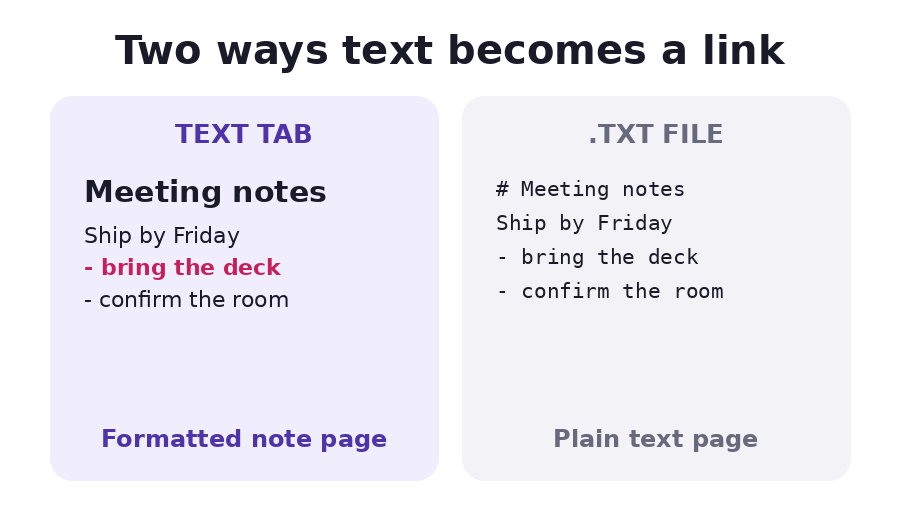
Snapy does not have one feature called text-to-link. It has two, and they behave differently enough that picking the wrong one is the usual complaint:
- Paste or type into the Text tab, above, and a formatted page is published at a URL. This is the note route.
- Drop an existing .txt file into the Upload file tab instead, and it is served as a plain file, shown as monospace text on the file page.
Both ask an anonymous visitor to confirm an email address the first time, a code typed in once per address and never again after that. Neither route skips it: the gate on Snapy covers any anonymous upload, not only a published page.
Neither route is more correct. A grocery list or a quick answer for someone else to read fits the note. A log file, a config dump, or a .txt someone already handed over fits the file route.
What actually survives each route
| Paste a note (Text tab) | Drop a .txt file (Upload file tab) | |
|---|---|---|
| Needs a confirmed email, once per address | Yes | Yes |
| Formatting kept | Headings, bold, italic, underline, lists, a link, blockquote, code block | None, text only |
| Colour, custom font, images in the body | Stripped on the server, even if typed | Never existed to strip |
| Displayed as | A styled page in a card | A plain monospace block in a <pre> |
| On-page length shown | No stated cap below the file size limit | First 300,000 characters, then a download note |
| Can be renamed on upload | Link name, yes | File name, yes |
That server-side stripping on the note route is deliberate, not a bug: the editor's toolbar only offers headings, bold, italic, underline, two list types, a link, a blockquote and a code block, and the server keeps exactly that set and nothing more. There is no control in the toolbar whose result silently disappears on publish, because the two lists were built to match.
Why the .txt route has no colour and no highlighting
The file page has one renderer for anything text-like: a .txt, a .log, a .py, a
.json, a .css, a .sql, even a .srt subtitle file. All of them fetch the raw bytes and
drop them into the same plain block, line breaks kept, nothing coloured and nothing
highlighted. A .md file gets the identical treatment on that route: the hashes and
asterisks show as typed characters, not as rendered Markdown. .csv and .tsv are the one
exception on that list, since those two are parsed into a table instead of left as a block.
What this will not do
It will not render Markdown formatting from a .txt or .md file dropped on the Upload
file tab; that stays raw text, asterisks and all. It will not keep a colour, a custom font,
an embedded image or a table pasted into a note, because the sanitiser only recognises the
handful of tags the toolbar itself offers. It will not let either route skip the one-time
email code for an anonymous visitor; a verified session carries over, but there is no
anonymous route around it on Snapy for text in either form. And it will not show more than
the first 300,000 characters of a long text file on its own page, though the download
button still hands over every byte.
The numbers that apply either way
One file can be up to 150MB. The free plan includes 1GB of storage and up to 400 files in a single bundle. An account can create 20 new links an hour. None of those change depending on which of the two routes made the link.
Related
- Host an HTML file or static site, free uses the same confirmed-email code, for a full page instead of a note.
- Share a password securely covers the one tab on the same uploader that makes no ordinary link at all.
- View a Markdown file online renders
.mdformatting in the browser without uploading anything, which the file route above does not do. - Turn a Word document into a link for formatted text that already exists as a .docx rather than as typed notes.
- All Snapy tools