Why does one image link behave two different ways?
The same URL answers two different requests differently, and that is the useful part:
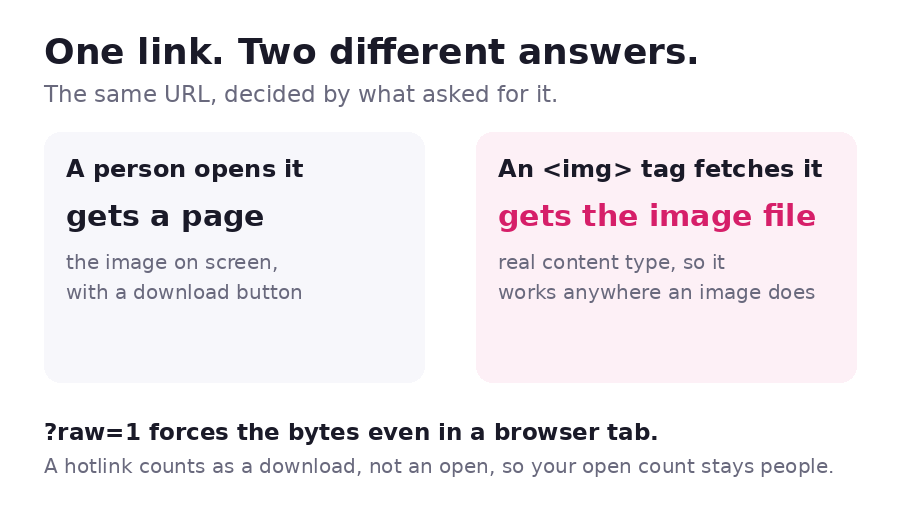
- A person opens it and gets a page: the image on screen, a download button, and your logo and contact bubble if you turned those on.
- A tag fetches it and gets the image file itself, with its real content type. So the link works as an image URL anywhere an image URL works.
<!-- both of these show the image -->
<img src="https://headshot.snapy.page/" alt="Headshot">
<img src="https://headshot.snapy.page/?raw=1" alt="Headshot">

What separates the two is the Accept header the request sends, which browsers and
<img> tags set differently without anyone having to think about it. ?raw=1 forces the
image bytes when you want them in a browser tab as well.
| Where you paste it | What arrives |
|---|---|
| An email or a chat message | A page showing the image |
An <img src> in HTML |
The image file |
Markdown  |
The image file |
| A QR code | A page showing the image |
?dl=1 on the end |
A download |
What does an image link actually count?
A person opening the link counts as one open. A tag fetching the image counts as a download, not an open. That matters if you embed the image on a busy page: the download number climbs with the traffic of the page it sits on, and the open number does not move. Nothing is double counted, and the two are never added together.
One exception worth knowing: if you switch the link to view-only, a cross-origin fetch is refused with a 403, so the link stops working as an embeddable image URL. A person can still open it and look at it. View-only and embedding are a genuine trade-off, not a setting you can have both ways.
Which image formats work?
| Formats | What happens | |
|---|---|---|
| Shown in the browser | PNG, JPG, JPEG, GIF, WebP, AVIF, BMP, ICO | The image appears on the page and the link works in an <img> tag |
| Hosted, offered as a download | HEIC, TIFF, PSD, AI | No browser renders these, so the page offers the file instead of displaying it |
| Refused | SVG | An SVG opens as a page and can carry script, so it is not accepted |
A single file can be up to 150MB, which is roughly six times what email will carry. The file is stored and served exactly as uploaded: nothing is resized, recompressed or stripped.
Can you put several images on one link?
Drop in more than one and you get a single link with a listing page rather than a link per
file. You choose how it opens: a list, small thumbnails, large thumbnails, or a slideshow
that advances on its own. Each image inside the bundle keeps its own direct URL, so
an <img> tag can point at one picture out of a set.
Can you name, lock or expire the link?
- Name it.
headshotgives youheadshot.snapy.page. Names that impersonate a bank, a wallet or a sign-in page are refused, which is why nobody can publishpaypal-verify.snapy.page. - Password, expiry and a QR code are all on the free plan.
- An email alert the first time somebody opens it, also free.
A password or an expiry date also switches the link out of search: a page that can vanish should not be left in Google's index after it has gone.
What is an image link good for?
Screenshots in a bug report, product photos, design mockups, headshots for a bio, event flyers, a scan of a document, a photo too large for email. If the point is that somebody sees the image exactly as it is, a link beats an attachment: nothing is recompressed on the way and nothing bounces.
Sending a document instead? Turn a PDF into a link. Publishing a page you built? Host an HTML file.