Track when clients open and read your proposals
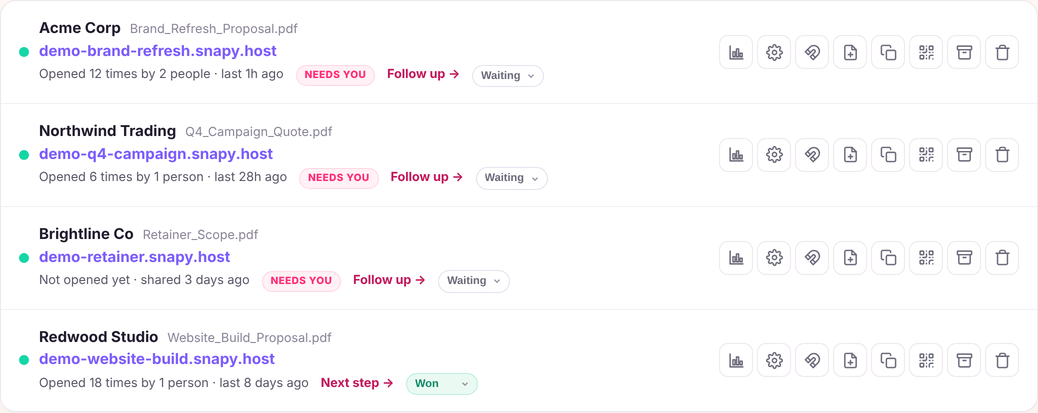
You do not need proposal software to write a proposal. What you need is a way to send the one you already wrote and find out what the client did with it: whether they opened it, how long they stayed, and which pages they read.
Most proposal software tries to replace how you write proposals. They force you into rigid, web-based editors with expensive monthly subscriptions starting at $30 to $50 per user.
Snapy takes a simpler, more effective approach: create your proposal in whatever tool you love, and let Snapy handle the tracking and follow-up.
Turn any PDF, pitch deck, or document into a fast, branded link. The moment your client opens it, you know. When they spend two minutes reviewing your fee schedule, you get an alert. And when it is time to check in, Snapy hands you the exact email message to send.
Three simple steps: upload, share, close
- Upload your proposal. Drop your completed proposal (PDF, Word, or presentation up to 150MB) into the box.
- Name your client & share the link. Add your client's name or company so your alerts and follow-up messages are personalized.
- Follow up at the perfect moment. Get notified the second they open your link, see which pages they read, and reach out while your proposal is top of mind.
Real signals, real alerts, clear actions
You do not need complicated charts. You need to know what your prospective client did and what action to take:
| Client Signal | Snapy Alert | Suggested Action |
|---|---|---|
| First open | Alex opened your proposal | Wait. Let them review uninterrupted for 2 to 4 hours. |
| Read pricing | Alex spent time on pricing | Offer to clarify. Reach out offering to answer scope or budget questions. |
| Returned later | Alex came back today | Follow up now. They are actively evaluating your proposal right now. |
| No open in 2 days | Your proposal may be missed | Send a short reminder. A quick note to confirm receipt. |
| Downloaded | Alex downloaded the file | Ask about next steps. They likely forwarded it internally. |
Built for solo professionals and independent consultants
- No client friction: Your prospect clicks and reads immediately in their browser. No accounts or software required.
- Fast mobile preview: Proposals render crisply on iPhones, iPads, and Android devices.
- Client privacy & security: Add password protection, require email verification, set expiry dates, or disable downloads.
- Simple, transparent pricing: Free to start with 1 active link. Upgrade to Snapy Pro for $19/month for unlimited proposals and smart follow-up assistance.
Related resources
- Proposal Tracking Software — Real-time open alerts and page reading analytics.
- Proposal Follow-Up Email Templates — 5 ready-to-copy follow-up messages matching client behavior.
- Secure Document Sharing — Password protection, expiry dates, and download controls.
- Simple Pricing Plans — Transparent Free and $19/month Pro plans.