Free, no sign-up. The Word file opens in Microsoft Word, Google Docs and Pages.
Why a range beats a single number
A single number on an estimate gets read as a quote. A range is honest about what you don't know yet, and it sets the client's expectations before the invoice does.
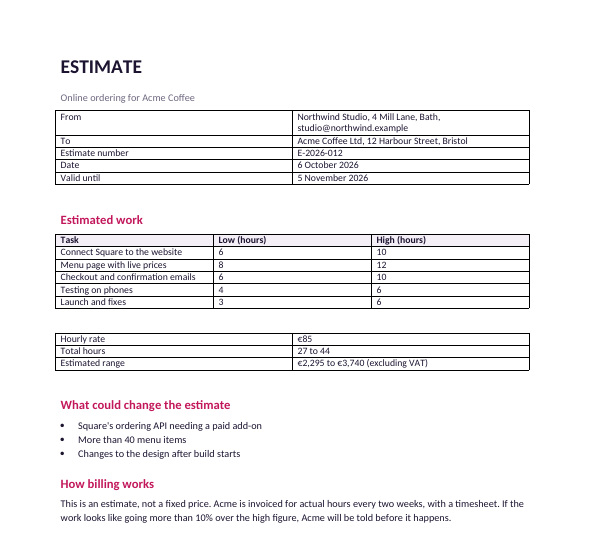
The filled-in example estimates online ordering for a coffee shop:
| Task | Low | High |
|---|---|---|
| Connect Square to the website | 6 h | 10 h |
| Menu page with live prices | 8 h | 12 h |
| Checkout and confirmation emails | 6 h | 10 h |
| Testing on phones | 4 h | 6 h |
| Launch and fixes | 3 h | 6 h |
| Total at €85/h | €2,295 | €3,740 |
How to build the range
- Split the work into tasks of a day or less. Large tasks hide the uncertainty.
- Low = everything goes to plan. High = the usual surprises happen.
- If a task's high is more than double its low, you don't understand it yet. Ask the client a question before you send the estimate.
- Name what could move it in its own section: "Square's API needing a paid add-on", "more than 40 menu items".
Say how billing works
This is the part that prevents a dispute: the client is invoiced for actual hours with a timesheet, and you tell them before the work goes more than 10% over the high figure. Put it in writing, as the template does.
If, after a first phase, you can fix the price, turn the estimate into a quote.
Send it as a link
Share the estimate as a Snapy.host link and you get an email when the client opens it, free. With Pro you can see whether they read the "what could change" section, the part you most want them to see.