Free, no sign-up. The Word file opens in Microsoft Word, Google Docs and Pages.
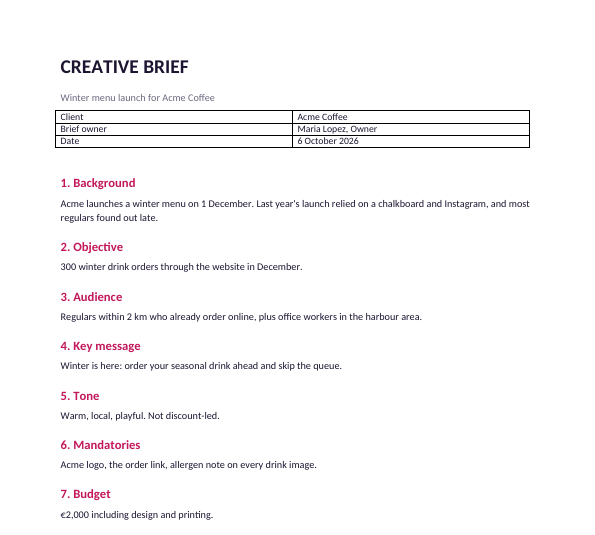
The 9 questions a brief must answer
From the filled-in example: a coffee shop launching a winter menu.
| Section | The question | Example answer |
|---|---|---|
| Background | Why now? | Last year's launch relied on a chalkboard; regulars found out late |
| Objective | What number? | 300 winter drink orders online in December |
| Audience | Who, exactly? | Regulars within 2 km who already order online |
| Key message | One thing to remember | Order your seasonal drink ahead and skip the queue |
| Tone | Three words, one to avoid | Warm, local, playful. Not discount-led |
| Mandatories | What must appear | Logo, order link, allergen note |
| Budget | The real number | €2,000 including printing |
| Timeline | Key dates | Concepts 27 Oct, final files 14 Nov |
| Approval | Who signs off | One named person |
The three parts that make or break a brief
- A measurable objective. "Raise awareness" can't be judged. "300 orders in December" can, and it changes what the designer makes.
- One key message. If the brief has three, the work will have none.
- A named approver. Briefs with "the team" as approver come back for a fourth round.
Getting a good brief from a client
Send the blank template before the kickoff call and ask the client to fill in what they can. Then go through it together for 20 minutes. Clients are usually clear on background and deadline and vague on objective and audience, so spend the call on those two.
When the brief is agreed, the deliverables and dates go into a statement of work.
Send the brief as a link
Share the brief as a Snapy.host link and you get an email when the client opens it, free, so you know it was read before the kickoff call.