Free, no sign-up. The Word file opens in Microsoft Word, Google Docs and Pages.
What a statement of work is for
A proposal convinces the client to say yes. A statement of work records what they said yes to. It is the document both of you open three weeks into the project when someone asks "was that included?"
| Proposal | Statement of work | Contract or MSA | |
|---|---|---|---|
| Job | Win the work | Define this project | Set the legal terms |
| When | Before the client decides | After yes, before work starts | Once per client |
| Contains | Approach, options, price | Deliverables, exclusions, dates, payments | Liability, confidentiality, termination |
| Signed? | Sometimes | Yes | Yes |
Statement of work vs scope of work
People search for both, and they overlap. The scope of work is the list of what is included and excluded (sections 2 and 3 of the template). The statement of work is the whole document around it: timeline, fees, client responsibilities, acceptance and sign-off. If a client only asked you for a scope of work, send sections 2 and 3 on their own.
The 11 sections, and what to write in each
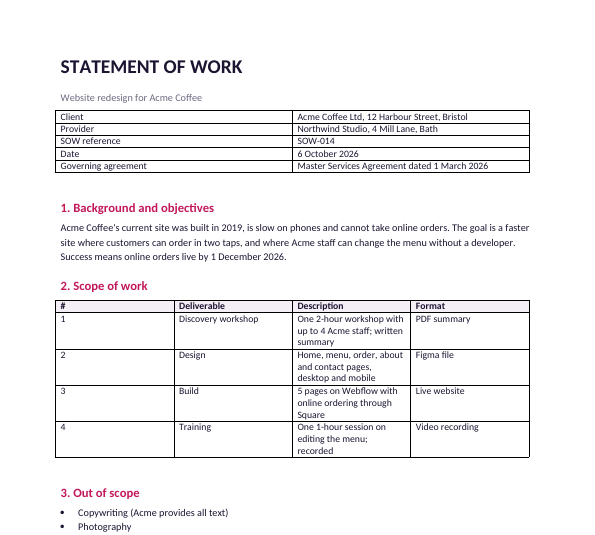
Every example line below comes from the filled-in example: a five-page website for a coffee shop, a fixed fee of €7,500, eight weeks.
1. Background and objectives. Two or three sentences in the client's own words, ending with how you will both know it worked. "Success means online orders live by 1 December 2026."
2. Scope of work. A table of deliverables with a number, a description and a format. If something is not in the table, it is not in the project. "Design: home, menu, order, about and contact pages, desktop and mobile. Figma file."
3. Out of scope. The things the client might reasonably assume are included. This short list prevents more arguments than any other section. "Copywriting (Acme provides all text). Photography. Ongoing hosting or support after launch."
4. Timeline and milestones. Each date next to what the client has to do first, so a late reply moves the date instead of squeezing you. "Site launched: 1 Dec 2026. Depends on: all copy and menu data received by 10 Nov."
5. Client responsibilities. What they provide, by when, and the one person who approves. "Reply to review requests within 5 business days."
6. Review rounds and acceptance. How many rounds of changes are included, and what counts as accepted. "Accepted when approved in writing, or 5 business days after delivery if no written feedback has been received."
7. Fees and payment. For a fixed fee, the total and the schedule. Tie payments to milestones, not dates, so they cannot fall due before the work is ready. "Deposit 40% on signing, 30% on design approval, 30% on launch. Invoices due within 14 days."
8. Changes to this SOW. How extra work is requested, priced and approved. "Any change needs a written change request signed by both parties. Extra work at €85 per hour, quoted before it starts."
9. Assumptions. Anything your price depends on. If an assumption turns out false, this is what lets you re-quote. "Acme's Square account supports online ordering in the UK."
10. Ownership. Who owns the work, and when it transfers. "Ownership transfers when the final payment is received. The studio may show the work in its portfolio."
11. Sign-off. Names, titles, signatures and dates for both sides.
Fixed fee or time and materials?
The template is written for a fixed fee, which most clients prefer. If you bill by the hour, change two sections:
- Section 7: replace the payment table with your hourly rate, the estimated hours, a cap the client must approve before you exceed it, and how often you invoice (for example every two weeks, with a timesheet).
- Section 8: a change request now changes the estimate and the cap, not a fixed price.
Keep sections 2 and 3 either way. Clients on hourly billing still need to know what is in and out.
Five lines that prevent most scope creep
- An out-of-scope list (section 3), written before the client asks.
- A number of revision rounds (section 6). "Unlimited revisions" is the most expensive phrase in client work.
- Deemed acceptance after a set number of days, so a silent client does not stall your final payment.
- Dates tied to client inputs (section 4), so their delay does not become your deadline.
- An hourly rate for changes (section 8), agreed before anyone needs it.
Before you send it
- Every deliverable has a format (Figma file, PDF, live site, video).
- Every date has the client step it depends on.
- The payments add up to the total.
- Someone who has not seen the project can read section 2 and know what they will get.
- It says which agreement it sits under, or that it stands alone.
Send it as a link, and see when it is read
Most SOWs go out as an email attachment, and then you wait. If you share it as a Snapy.host link instead, you get an email the moment the client opens it, on the free plan. With Pro you also see which pages they read and for how long, so you know whether they reached the fees section before you follow up. The client just clicks the link; there is nothing to install.