A QR code cannot hold a PDF
This is the part most instructions skip. A QR code is a way of writing text as a picture, and the text it can hold is a few hundred characters at best. A PDF is measured in hundreds of thousands. So a QR code never contains the document, only the address where the document lives, which means the real task is getting a short, stable address for the file first.
That is why a QR code generator on its own is not enough. Upload the PDF, get the link, and the code follows from it.
The code is generated from the link, not the file
Once the upload finishes, the result panel shows a QR code button. It returns a PNG,
sized to the address it encodes, and a download link that saves it as snapy-qr.png.
Two consequences worth knowing:
The printed code outlives the file. Replace the PDF behind the link next season and every poster, every menu and every business card still works, because none of them encode the document. This is the difference between a link and a direct file address, and it is the reason to bother with a link at all.
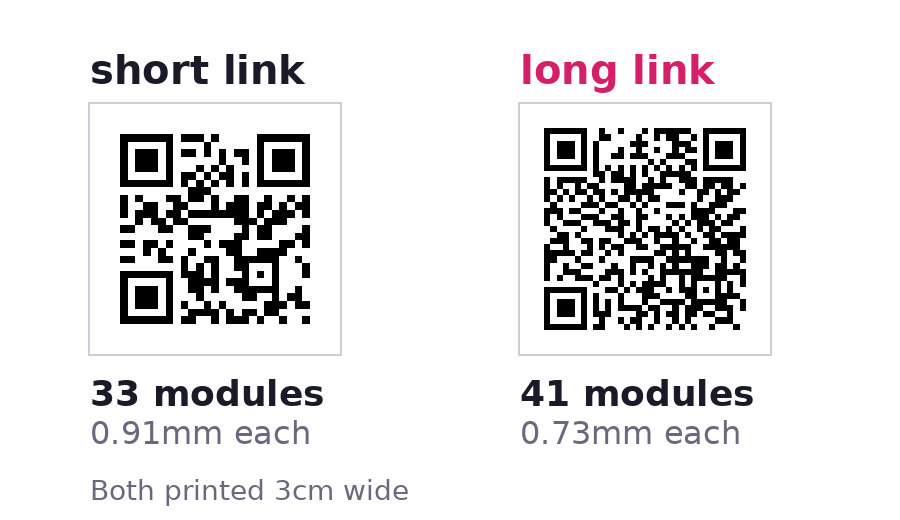
A shorter link makes a simpler code. The pattern gets denser as the text inside it gets longer, in fixed steps. Measured on the real generator:
| The address encoded | PNG size | Grid | At 3cm wide |
|---|---|---|---|
https://menu.snapy.page/ |
330 x 330 | 33 x 33 modules | 0.91mm per module |
https://menu.snapy.page/holiday-photos-2026 |
410 x 410 | 41 x 41 modules | 0.73mm per module |
Eight more modules across the same printed square means each one is 20% smaller, and the
module size is what decides whether a phone can read it from a metre away. So a link named
menu is not just tidier than autumn-menu-final-v3, it prints better.
Four ways a printed QR code fails
Every one of these is a real failure, not a design preference.
- Printed too small. Below about 2cm across, a handheld scan starts missing modules. A code meant to be read from across a room needs roughly one tenth of the reading distance in width, so a code read from 2 metres wants about 20cm.
- The quiet zone got cropped. A scanner needs a blank margin to find the edges of the code. The download already includes four modules of white border. Trimming tight to the pattern, or dropping the code onto a dark photo, removes it and the scan fails.
- The link was shortened again. Running the address through a second shortener adds a redirect and a different domain, which turns a code that works into one that depends on two services instead of one.
- The link expired. An expiry date is a feature here, and it applies to the QR code too. A code printed on something long lived should point at a link with no expiry set.
What this will not do
The generator only accepts addresses on snapy.host and snapy.page. Paste a link from
another host and it is refused with an error, deliberately, because an open QR service that
will encode anything is a phishing tool. It also does not style the code: no logo in the
middle, no colours, no rounded modules. It returns a plain black and white PNG, which is
the version that scans most reliably.
There is no scan counter either. A scan arrives as an ordinary open of the link, so it lands in the same count as a click from an email, and nothing distinguishes the two.
Test the printed copy, not the screen
Scanning a code on a monitor from 20cm away proves almost nothing. Print it at the size it will be used, put it where it will live, and scan it from where a person will stand. That one check catches the cropped quiet zone and the too small print, which between them are most of the codes that fail in the wild.
One PDF can be up to 150MB, and the free plan includes 1GB of storage, one live link, a custom link name, a password, an expiry date and the QR code.
Related
- Turn a PDF into a shareable link covers the upload step on its own, without the printing detail.
- Give a PDF a direct download link is the opposite choice: it hands the file over instead of opening it in the browser.
- Turn an image into a link does the same job for a photo or a
graphic, including using the link inside an
<img>tag. - See when someone opens your document explains what the open count behind a scanned code actually records.
- Everything else lives on the Snapy tools page.