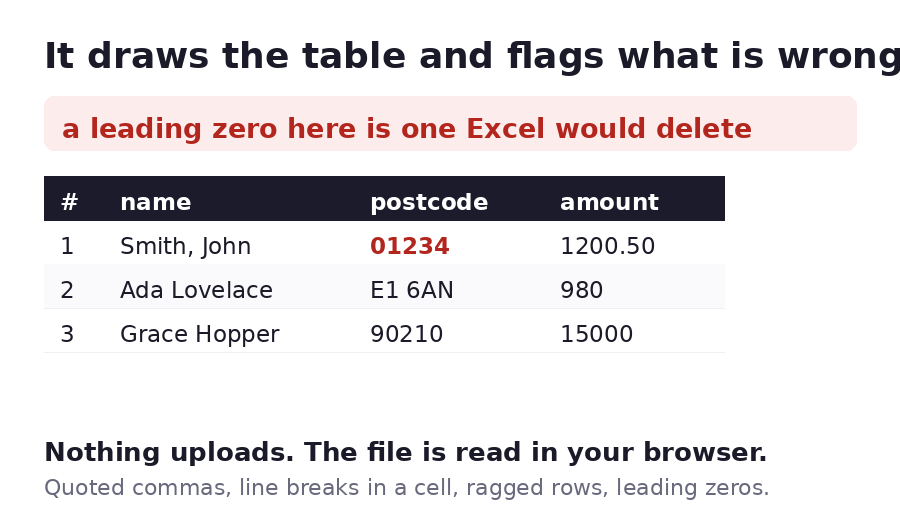
Check it here, before you send it
Drop a CSV here, , or paste the text below.
Nothing uploads. The file is read in your browser, so the viewer works on a file you would not want to hand to a website at all.
What it checks while it draws the table
A CSV is text with separators, so it has no formatting to break. What breaks instead is the data, and always in the same handful of ways. The viewer counts each one:
- The separator. It detects comma, tab, semicolon or pipe from the first few lines, and
you can override it. A semicolon file saved as
.csv, which is what several European versions of Excel produce, is the usual reason a CSV opens as one wide column. - Quoted fields. A field in quotes may hold the separator, a line break or an escaped
"". All three are read properly, and an opening quote that is never closed is reported rather than silently swallowing the rest of the file. - Ragged rows. Any row with a different number of columns from the header is counted. That is the single most common reason an import fails halfway.
- Leading zeros. Values like
01234are counted and flagged, because Excel will read that as the number 1234 and delete the zero. Postcodes, phone numbers and internal IDs are where this bites.
Then share it, if that is what you came for
Checking a file and sending it are two different jobs. Once the table looks right, upload it and you get a link that draws the same table for whoever opens it. They need no account, no Excel and no download.
| Limit | Value |
|---|---|
| Characters read in this viewer | 400,000 |
| Rows drawn in this viewer | 2,000 |
| One uploaded file | 150MB |
| Free storage | 1GB |
What this will not do
It will not edit the file. There is no cell to type into, no sort, no filter and no formula, because the moment a tool edits your data it has to be trusted with it, and this one is not asking you to.
It will not convert the CSV into a spreadsheet format, and it will not repair a broken export. What it does is tell you it is broken, accurately, before the file goes anywhere.